Gradient embroidery for Coloreel units

Coloreel Digitizing

Coloreel digitizing prepares designs for a Coloreel unit, which dyes white thread as it sews so one needle can stitch gradients and unlimited colors. We build the DST with stitch paths that suit color blends, then create the matching CSE color file in Coloreel Studio. Each Coloreel design has one flat price, delivered in 4–8 hours.

Stitch file plus CSE color file in one order
Color transitions set within the CCP tolerance
Small text kept in flat color so it stays legible
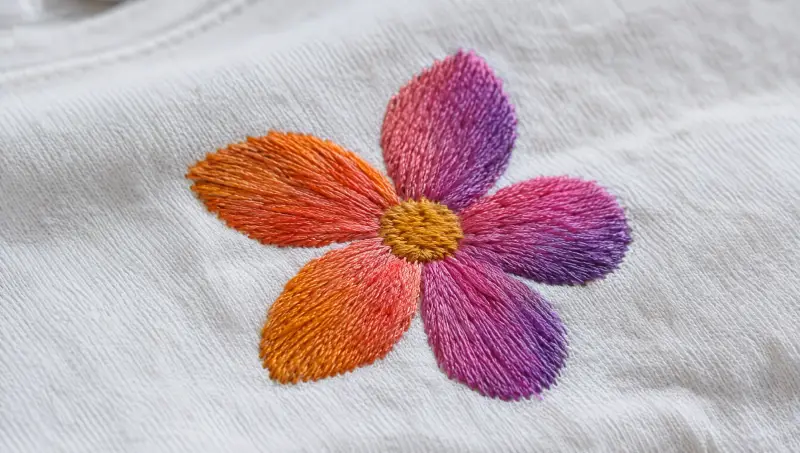
An embroidered flower whose petals shift from orange to pink to purple Illustrative photo
Digitizing since 2015
Send your Coloreel design
Stitch file and CSE color file, built together
From $20 per design
Stitch paths planned for smooth color blends
CSE color file created in Coloreel Studio
Preview image and color reference list

Free quote, nothing to pay now. Need rush, formats or notes? Use the full form

Unlimited
Revisions, no time limit
2
Files: stitches + color
CSE
Coloreel color file format
~0.2 in
Text below this stays flat color
4–8h
Standard delivery
At a glance

Coloreel digitizing specs

What it isA stitch file planned for color blends, plus the CSE color file a Coloreel unit reads to dye the thread
Who it is forEmbroidery shops running a Coloreel unit on their machine
Color fileCSE, created in Coloreel Studio, Coloreel's own software, from the stitch file we build
CCPColor Change Precision: the MIN/MAX value Coloreel Studio shows for how precisely color changes land; we keep transitions within it
Works best onLarge fills, bold shapes and larger lettering, where a gradient has room to read
Kept flat colorText under about 0.2 in and fine detail
Files deliveredDST (or your machine format), CSE color file, preview image and color reference list
What to sendArtwork, finished size, where you want color to flow and any color references
PriceFlat rate per design; rush +50%. See the price table below
TurnaroundStandard 4–8 hours · Rush 2–4 hours · Super rush 1–2 hours, 24/7
How Coloreel changes the file

A Coloreel design is two files working together

A conventional machine changes color by switching needles, so a design is planned as solid blocks of thread with trims and color stops between them. A Coloreel unit colors a single white thread as it feeds the needle, so color can shift gradually along one continuous run of stitches.

To use that, the stitch file and the color file have to be planned together. We build the stitch file, color it in Coloreel Studio, set the color transitions within the CCP (Color Change Precision) tolerance and review the preview before delivery.

A file digitized for a multi-needle machine can still be colored in Coloreel Studio, but its stitch paths were laid out for solid blocks, so blends tend to break where the paths do. If you run the same logo on standard machines too, keep a conventional multi-color embroidery file alongside it, or have us build a flat-color version of your brand logo.

Gradients read best on big areas. Lettering under about 0.2 in stays in flat color, because a blend across a letter that small is not visible and only costs legibility.

What we build in
01

Stitch paths for blends

Fill direction and sequencing are planned so the color can travel along long, continuous runs instead of breaking at every trim.
02

CSE file from Coloreel Studio

The color file is created in Coloreel's own software from the stitch file we built, so the two always belong together.
03

Transitions within CCP

Color changes are placed with the CCP MIN/MAX values in mind, so a shift meant for an edge does not depend on more precision than the thread can give.
What a Coloreel unit can sew

Color effects from a single needle

Because the unit dyes the thread as it sews, one fill area can change color without a thread change. These are the effect types we plan stitch paths for.

Linear gradient
A smooth blend from one color to another across a fill area.
Multi-color gradient
Three or more colors blending in sequence, for example green to blue to purple.
Radial gradient
Color that blends outward from a center point, for glows and halos.
Shadow and depth
Dark to light shading that makes flat logo shapes look lit and rounded.
Noise and texture
Controlled color variation across a fill for a mottled, textured look.
Stripes and patterns
Alternating bands of color inside one fill area, sewn without stopping to change thread.

Swatches are color illustrations, not photos of sewn work.

You receive

What comes with every Coloreel order

FileWhat it does
DST (or your machine format)Drives the embroidery machine: stitch paths, density and sequence
CSE color fileTells the Coloreel unit what color to dye the thread along the design, created in Coloreel Studio
Preview imageShows the intended colors and gradients so you can approve or ask for changes
Color reference listThe colors used in the design, with the references you gave us (Pantone or thread chart) where supplied

Matching a brand color to a thread chart first? The thread color matcher gives you a starting reference to send with your artwork.

Good for / not good for

Where a Coloreel gradient earns its place

We tell you before building if part of the design will read better in flat color.

Design elementGradient?Why
Large fills and bold shapesYesPlenty of stitch length for a blend to develop and be seen
Larger lettering and wordmarksYesColor can flow through the letters while the shapes stay crisp
Text under about 0.2 inKeep flat colorA blend across a letter that small is invisible and can hurt legibility
Fine outlines and small detailUsually flat colorShort stitch runs leave little room for a color change to land cleanly
Coloreel Studio and CCP

What CCP actually means

Coloreel Studio is Coloreel's software. It imports the stitch file and is where the colors and gradients are assigned; it produces the CSE color file the unit reads.

CCP stands for Color Change Precision. Thread consumption varies slightly from one run to the next, so Coloreel Studio shows minimum and maximum CCP values for how precisely a color change will land along the stitching. We design transitions within that tolerance, which matters most where a color change has to meet an edge.

Pricing

What Coloreel digitizing costs

One flat price per design, covering both the stitch file and the color file.

DesignPriceNotes
Coloreel design: stitch file + CSE color file$20Includes a preview image and color reference list
Rush (2–4 hours)+50%Added to the base price of the design
Super rush (1–2 hours)+50%Added to the base price of the design

Flat rate per design, not per 1,000 stitches. Every price includes all machine formats, a stitch simulation preview and unlimited revisions with no time limit. Standard delivery is 4–8 hours, 24/7.

Common problems

A recolored standard file vs a Coloreel build

The unit can only blend as smoothly as the stitch paths allow.

What goes wrong
Blends break at trims. Stitch paths laid out for solid blocks interrupt the gradient.
Visible banding. Transitions placed across short, choppy runs of stitches.
Unreadable small text. Gradients applied to lettering too small to show them.
Color changes miss their edge. Transitions set tighter than the CCP tolerance allows.
Brand colors guessed. No color references, so shades drift from the brand guide.
How we build it
Paths planned for color. Long, continuous runs where the gradient needs to travel.
Transitions on long runs. Blends placed where there is stitch length to develop.
Flat color for small text. Lettering under about 0.2 in stays legible.
CCP-aware placement. Changes positioned within the tolerance Coloreel Studio shows.
Color reference list. Your references recorded and delivered with the files.
What to send

What we need for a Coloreel file

  • Artwork: vector or a high-resolution image showing the gradients you want
  • Finished size in inches
  • Color intent: where color should flow, and the start and end shades
  • Color references: Pantone, thread chart numbers or a brand guide
  • Garment and placement, such as a left chest, full back or cap front
  • Machine format your embroidery machine runs
How it works

From artwork to stitch and color files

Share the artwork and color intent
Show us where the gradients go and send any color references you have.
We build the stitch file
Fill directions and sequencing planned so color can travel along continuous runs.
We color it in Coloreel Studio
Transitions set within the CCP tolerance, the CSE file created and the preview reviewed.
Approve and load both files
Check the preview, ask for changes if needed, then load the stitch file and CSE file.
FAQs

Coloreel digitizing questions

A DST (or your machine's format) that drives the embroidery machine, the matching CSE color file for the Coloreel unit, a preview image and a color reference list.

CCP stands for Color Change Precision. Because thread consumption varies slightly between runs, Coloreel Studio shows minimum and maximum CCP values for how precisely color changes land along the stitching. We design color transitions within that tolerance.

Coloreel Studio is Coloreel's software. It imports the stitch file, lets colors and gradients be assigned to it, and produces the CSE color file the unit reads. We build the stitch file first, then create the CSE file in Studio.

It can be colored in Coloreel Studio, but a file digitized for a multi-needle machine has stitch paths, trims and color stops planned for solid blocks of thread. Gradients tend to break where those paths do, so designs meant to blend work best built for Coloreel from the start.

Large fills, bold shapes and larger lettering. Text under about 0.2 in and fine detail read better in flat color, because a blend across something that small is not visible. We flag elements we would keep flat before building.

Send Pantone references, thread chart numbers or your brand guide. We use them when coloring the design and list them on the color reference list. As with any color work, sew a first piece on the real garment before a production run.

Coloreel changes the thread color, not how a cap front behaves, so the stitch file still needs center-out cap sequencing. Cap fronts are small, so keep gradients on the larger elements and tell us the design is for caps when you order.

We keep three free guides: what Coloreel embroidery is on how the unit dyes the thread, Coloreel machines and setup on what the unit needs on the machine, and artwork for Coloreel gradients on preparing the design. No sign-up, and nothing to buy.

A Coloreel design has one flat price covering the stitch file, the CSE color file, a preview image and a color reference list, plus unlimited revisions; see the price table on this page or the full price list. Rush (2–4 hours) and super rush (1–2 hours) add 50%.

Put your Coloreel unit's gradients to work

Send the artwork and where you want color to flow, and we'll return a stitch file and CSE color file with a preview, at a flat price per design.

Stitch file and CSE color file in one order
Every machine format included
Unlimited revisions, no time limit

New registered business? Your first design is free: one Simple or Medium design at standard turnaround. How the free first design works
Ordering for clients or in volume? See trade & distributor accounts.

1
Standard: 4–8 hours
Flat price per design, 24/7
2
Rush: 2–4 hours
+50% on the base price
3
Super rush: 1–2 hours
+50% on the base price
Upload your Coloreel design →

Invoiced by Zorixo Ventures, LLC · W-9 on file

Upload artwork Call